-1.png?width=150&height=31&name=logotipo_centro_de_ayuda%20(1)-1.png)
Available for these licences:
 Event App Starter, Pro, Enterprise
Virtual Venue Starter, Pro, Enterprise
Suite Starter, Pro, Enterprise
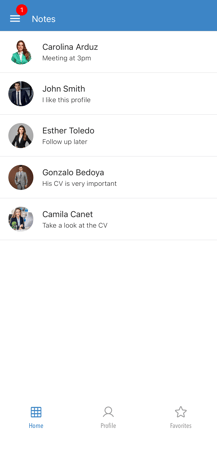
The Notes module is a compilation of all the notes that an attendee has created about other attendees.
The notes are used to record important or interesting details about that attendee, whether more contact information, times in which they can be contacted or any other type of annotation desired.
Here we show you how it works:
IMPORTANT❗This module is only available for the event in the App.
On the Web it is activated by default to record notes from attendees (although they are not downloadable).
How it is displayed in the App 📱
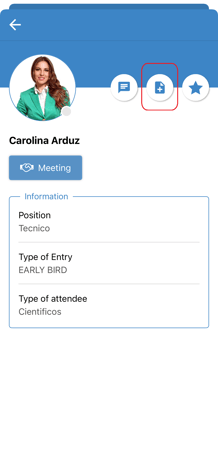
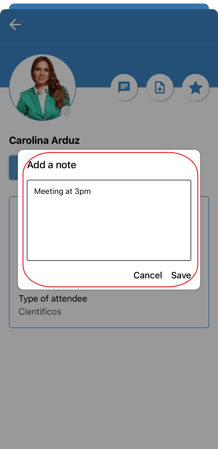
1. To create a note, the attendee goes to the Attendees module and clicks on the attendee's name to enter and will see a "note with a +" icon, where he can write a comment.
2. Upon entering the Notes module, the attendee has a list of the attendee notes he has created so far.
Downloading Notes
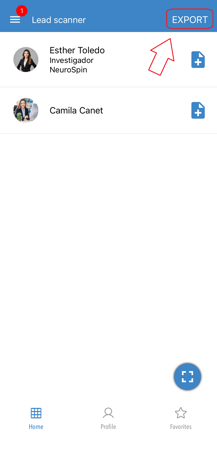
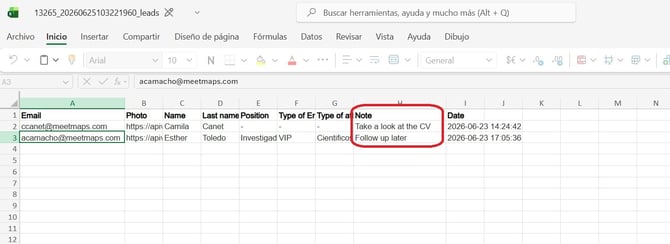
It is possible to download the list of notes collected from attendee profiles or the 1to1 Meetings module only if their QR codes have been scanned using the Lead Scanner module in the App (this module is available depending on your contracted Meetmaps license). These notes will be displayed in a specific column within the downloaded Excel file.
If you want more information on this module read this article +info 👉What is the Lead Scanner section?