![BLAU__EMBLEMA PRINCIPAL SENSE ESLOGAN (1)-1.png]](https://help.meetmaps.com/hs-fs/hubfs/BLAU__EMBLEMA%20PRINCIPAL%20SENSE%20ESLOGAN%20(1)-1.png?height=40&name=BLAU__EMBLEMA%20PRINCIPAL%20SENSE%20ESLOGAN%20(1)-1.png)
Available for these licenses:
 Event App Enterprise
Suite Enterprise
IMPORTANT ❗This functionality is only available for the App📱.
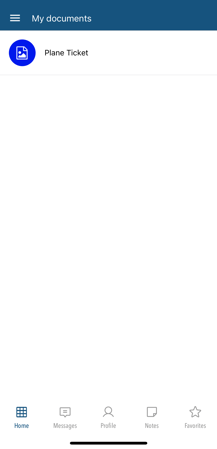
It's very easy to set up personal documents for event attendees so that each person can view their own documents. For example: flight or hotel reservations.
Configuration
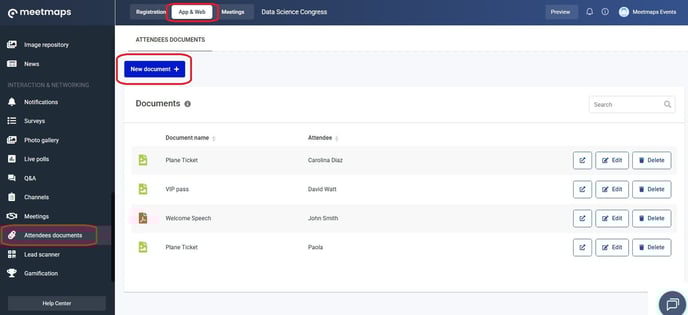
1. In App & Web > Attendee Documents, click on "New document +".
 2. In the pop-up window, select the attendee you want to assign the document to (they must be on the event attendee list). Add a title and click "Save".
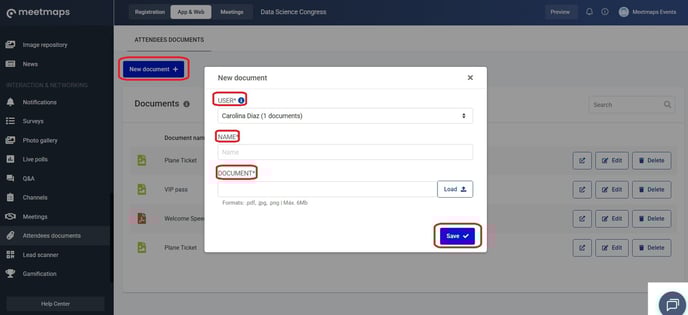
NOTE 🗒️: The accepted formats are pdf, jpg, and png., and the maximum possible size is 6 MB.
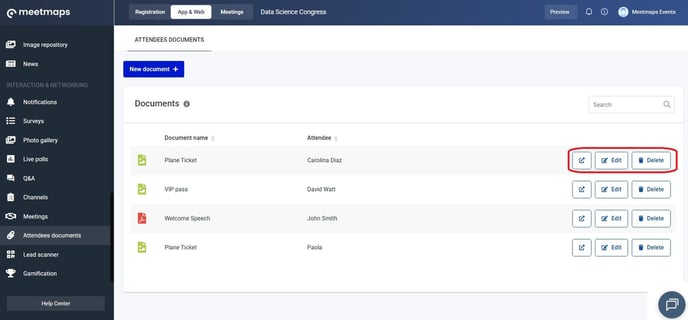
3. You can edit, delete, or view the file in a new tab by clicking on the icons to the right.
IMPORTANT ❗ To make this module visible, you need to activate it in App & Web > Modules 👉 What is the modules section?
As shown
App 📱