
If your using Meetings 1to1 for your event, from the dashboard you can track the real-time status of the meetings. To do this, you should go to the Meetings Panel > Matchmaking > Meeting table.
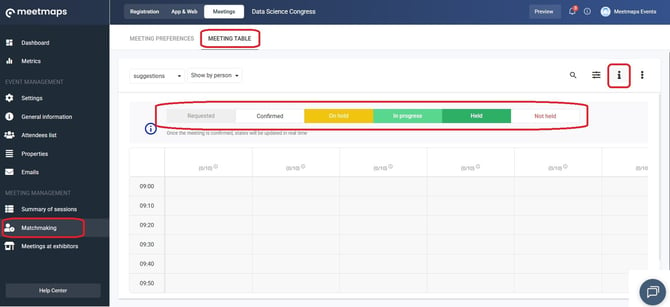
Below, you will find the schedule of meetings and a legend of states:
- Requested: When an attendee has requested a meeting but the other party has not yet accepted it.
- Confirmed: When the meeting request has been accepted.
- On hold: When one of the attendees has accessed the video call connection, but the other party has not. Both attendees will be marked as "Waiting."
When you have a meeting in waiting, you can identify which attendee has already joined the video call and is awaiting the other party to join. Simply click on the attendee's name, and a menu will appear with the option "View meeting status". - In progress: When both attendees have accessed the meeting connection, and therefore the meeting is ongoing.
- Held: When the meeting has finished and the attendees have accessed the video call, thus the meeting has taken place.
- Not held: When the meeting's time is up and one or neither of the attendees have connected to the video call, the meeting has not taken place.
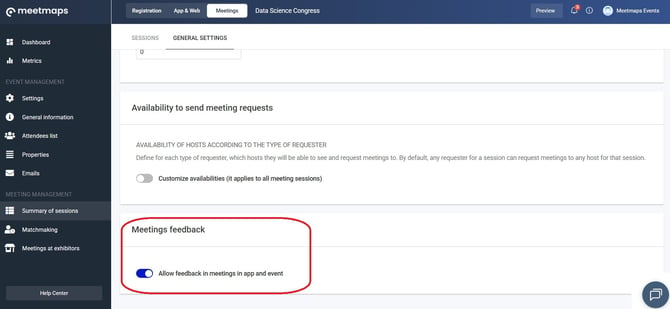
NOTE🗒️: If this option is enabled, once the meeting has ended, attendees will see a window where they can rate the meeting. They will be able to indicate whether the meeting actually took place and, if not, provide the reason why.
IMPORTANT❗The "Pending" and "In progress" statuses only apply to meetings that include video calls.
NOTE🗒️: The panel logs access to the video call; however, if both participants joined at different times without ever being present simultaneously, the meeting is not considered to have taken place. In such a case, when you indicate on the form that the meeting did not occur, the panel automatically updates its status to "Did not take place."
Using this panel, you can easily distinguish between requested and confirmed meetings, as well as track the status of meetings taking place among your event attendees.