---
title: What is the HTML Pages section?
description: Discover how to create HTML pages for your event.
---
[Skip to content](https://help.meetmaps.com/en/what-is-the-html-pages-section#main-content)
- [English](https://help.meetmaps.com/en/what-is-the-html-pages-section)
- [Español](https://help.meetmaps.com/es/que-es-el-apartado-paginas-html-y-como-se-configura)
English
Show submenu for translations
[-1.png?width=150&height=31&name=logotipo_centro_de_ayuda%20(1)-1.png)](https://help.meetmaps.com/en?hsLang=en)
- [Default HubSpot Blog](https://2228536.hs-sites.com/blog)
Open main navigation
Close main navigation
- [Default HubSpot Blog](https://2228536.hs-sites.com/blog)
- - [English](https://help.meetmaps.com/en/what-is-the-html-pages-section)
- [Español](https://help.meetmaps.com/es/que-es-el-apartado-paginas-html-y-como-se-configura)
English
Show submenu for translations
- [www.meetmaps.com](https://welcome.meetmaps.com/en/)
[www.meetmaps.com](https://welcome.meetmaps.com/en/)
How can we help?
- There are no suggestions because the search field is empty.
1. [Knowledge Base](https://help.meetmaps.com/en?hsLang=en)
2. [Event information](https://help.meetmaps.com/en/event-information?hsLang=en)
3. [Pages HTML](https://help.meetmaps.com/en/event-information?hsLang=en#pages-html)
# What is the HTML Pages section?
## Discover how to create HTML pages for your event.
---
Available for these licences:
* **Access** Starter, Pro, Enterprise*
* **Event App** Starter, Pro, Enterprise*
* **Virtual Venue** Starter, Pro, Enterprise*
* **Suite** Starter, Pro, Enterprise*
---
### What are HTML pages?
Meetmaps' Event Management Software is highly modular but has its limitations. Therefore, you can create HTML and embed them in:
- Landing
- Home web
- App
For example, content could be paragraphs, a bulleted list, buttons with links, images, and data tables.
### How to create an HTML page 📄?
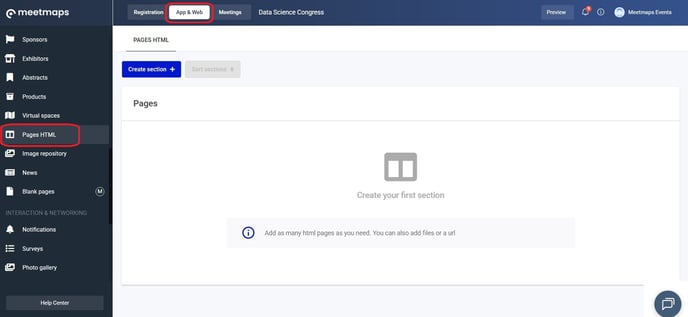
1. In **App & Web \> HTML Pages** click in **"Create section+".**
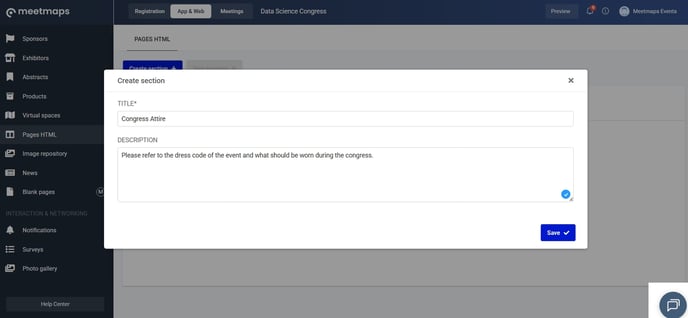
2. Put a title and a description. Click **"Save"**.
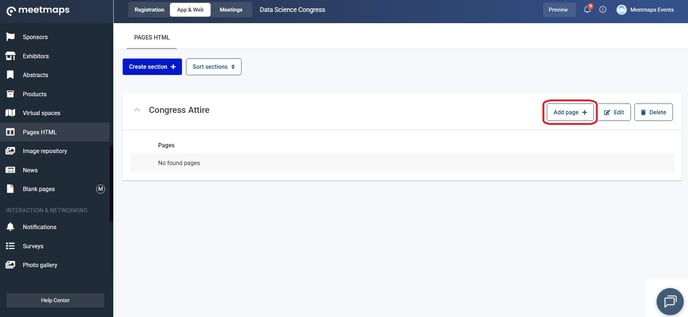
3. Click **"Add page+"**.
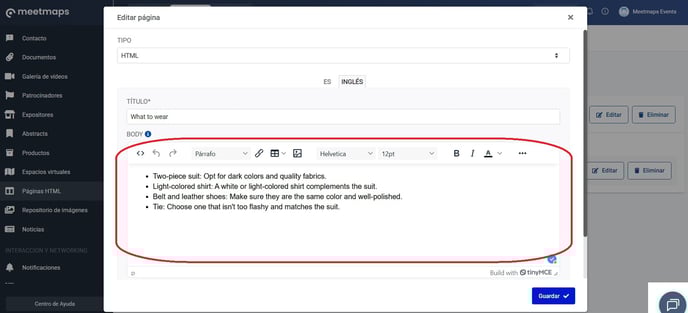
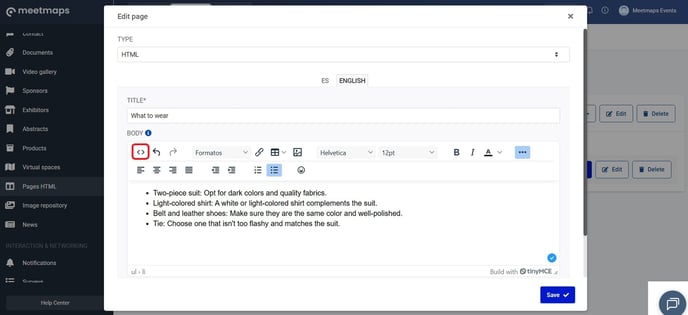
4. In the pop-up window, add a title in the languages you've configured. To add the body of the HTML page, you can:
\- Use the editor box and its functions
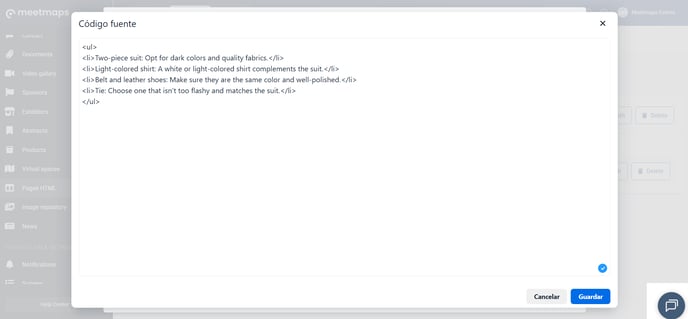
\- Click on the **"\< \>"** button and edit the code there.
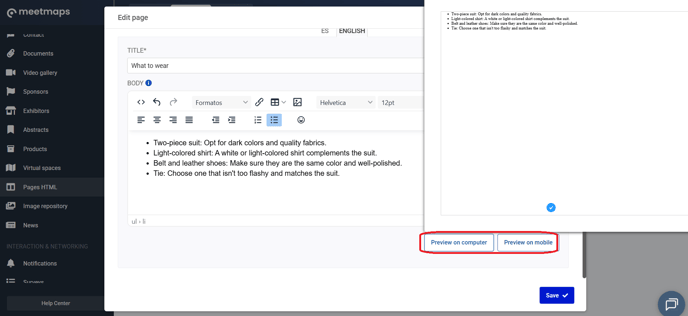
**NOTE 📃:** to see how the HTML looks:
Both in sessions and in the HTML pages themselves, you can also:
- Make it visible with the **"eye button 👁️"**
- Delete it with the **"Delete' button"** 🗑️.
- Edit the content with the **"Edit' button"** 📝.
- Organize the sections with the **"Organize Sections🔃"** button.
- Organize the HTML pages within the sections by dragging up or down from the six points on the left.
**IMPORTANT❗** The creation of code and HTML modules is the responsibility of the **event organizer**, as we do not create them at Meetmaps.
### How do I embed an HTML page?
#### Landing💻
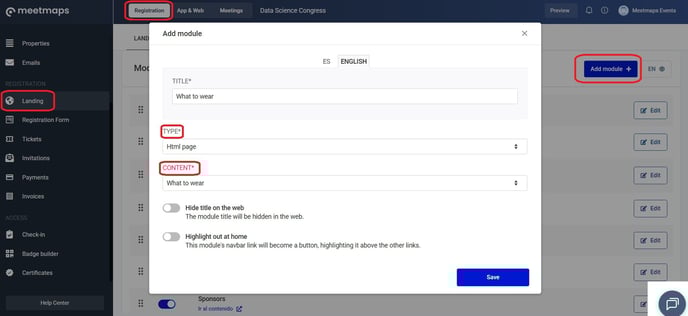
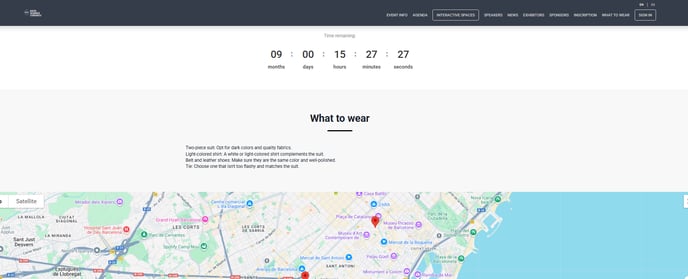
In **Registration \> Landing** add an **HTML Page** module. Select the content you want (previously added to the HTML Pages section following the steps above). Save the module, activate the button, and it will appear on the landing page.
#### Home Web💻
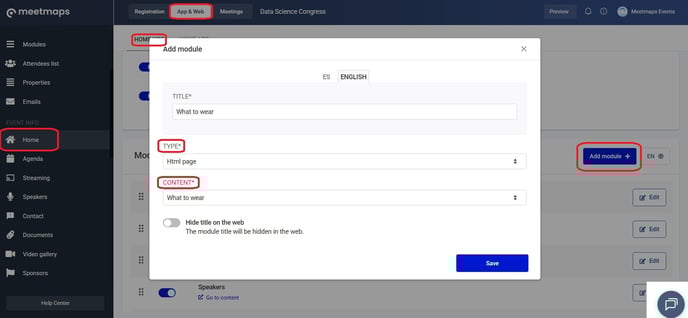
In **App & Web \> Home \> Home Web** add a **"HTML Page"** module and the content (previously added to the HTML Pages section following the steps above). Click **"Save",** activate the switch and it will appear on the Home page.
App / Web Superior 📱💻
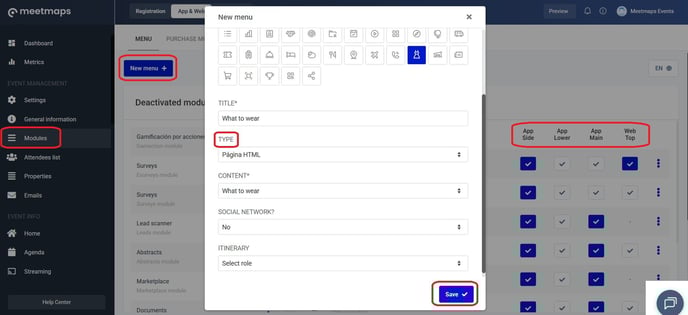
In **App & Web \> Modules** click **"New menu+"** to create an HTML Page module and select the desired page. Activate it, and select where you want it to be displayed: top web, side app, main app, or lower app.
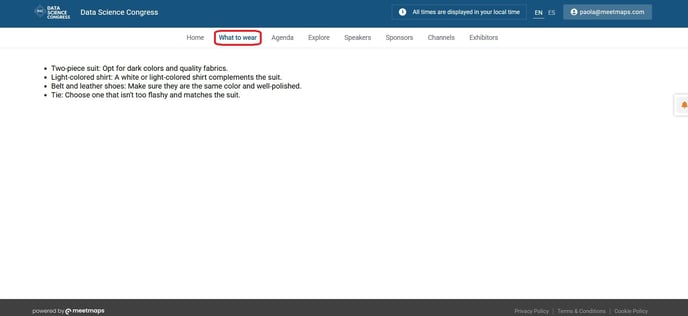
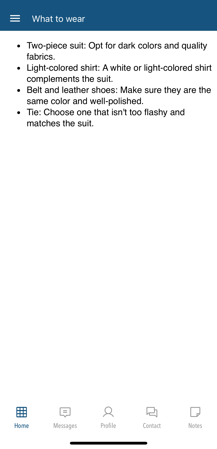
#### **How it looks on**
**Landing 🌐**
****
**Home Web💻**
**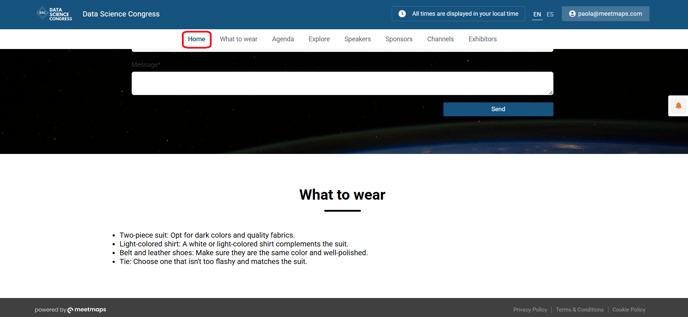**
**App/Web superior 📱**
- [First steps](https://help.meetmaps.com/en/first-steps?hsLang=en#main-content)
- [Meetmaps Account](https://help.meetmaps.com/en/first-steps?hsLang=en#meetmaps-account)
- [Branding](https://help.meetmaps.com/en/first-steps?hsLang=en#branding)
- [Onboarding](https://help.meetmaps.com/en/first-steps?hsLang=en#onboarding)
- [Event Management](https://help.meetmaps.com/en/event-management?hsLang=en#main-content)
- [Metrics](https://help.meetmaps.com/en/event-management?hsLang=en#metrics)
- [Settings](https://help.meetmaps.com/en/event-management?hsLang=en#settings)
- [General information](https://help.meetmaps.com/en/event-management?hsLang=en#general-information)
- [Modules](https://help.meetmaps.com/en/event-management?hsLang=en#modules)
- [Attendee List](https://help.meetmaps.com/en/event-management?hsLang=en#attendee-list)
- [Properties](https://help.meetmaps.com/en/event-management?hsLang=en#properties)
- [Emails](https://help.meetmaps.com/en/event-management?hsLang=en#emails)
- [Event information](https://help.meetmaps.com/en/event-information?hsLang=en#main-content)
- [Home](https://help.meetmaps.com/en/event-information?hsLang=en#home)
- [Agenda](https://help.meetmaps.com/en/event-information?hsLang=en#agenda)
- [Streaming](https://help.meetmaps.com/en/event-information?hsLang=en#streaming)
- [Speakers](https://help.meetmaps.com/en/event-information?hsLang=en#speakers)
- [Contact](https://help.meetmaps.com/en/event-information?hsLang=en#contact)
- [Documents](https://help.meetmaps.com/en/event-information?hsLang=en#documents)
- [Video gallery](https://help.meetmaps.com/en/event-information?hsLang=en#video-gallery)
- [Sponsors](https://help.meetmaps.com/en/event-information?hsLang=en#sponsors)
- [Exhibitors](https://help.meetmaps.com/en/event-information?hsLang=en#exhibitors)
- [Premium Exhibitors](https://help.meetmaps.com/en/event-information?hsLang=en#premium-exhibitors)
- [Abstracts](https://help.meetmaps.com/en/event-information?hsLang=en#abstracts)
- [Products](https://help.meetmaps.com/en/event-information?hsLang=en#products)
- [Virtual spaces](https://help.meetmaps.com/en/event-information?hsLang=en#virtual-spaces)
- [Pages HTML](https://help.meetmaps.com/en/event-information?hsLang=en#pages-html)
- [Images](https://help.meetmaps.com/en/event-information?hsLang=en#images)
- [News](https://help.meetmaps.com/en/event-information?hsLang=en#news)
- [Interaction in the event](https://help.meetmaps.com/en/interaction-in-the-event?hsLang=en#main-content)
- [Notifications](https://help.meetmaps.com/en/interaction-in-the-event?hsLang=en#notifications)
- [Survey](https://help.meetmaps.com/en/interaction-in-the-event?hsLang=en#survey)
- [Photo Gallery](https://help.meetmaps.com/en/interaction-in-the-event?hsLang=en#photo-gallery)
- [Live polls](https://help.meetmaps.com/en/interaction-in-the-event?hsLang=en#live-polls)
- [Q & A](https://help.meetmaps.com/en/interaction-in-the-event?hsLang=en#q-a)
- [Channels](https://help.meetmaps.com/en/interaction-in-the-event?hsLang=en#channels)
- [Attendees documents](https://help.meetmaps.com/en/interaction-in-the-event?hsLang=en#attendees-documents)
- [Lead scanner](https://help.meetmaps.com/en/interaction-in-the-event?hsLang=en#lead-scanner)
- [Gamification](https://help.meetmaps.com/en/interaction-in-the-event?hsLang=en#gamification)
- [Registration & Access control](https://help.meetmaps.com/en/registration-access-control?hsLang=en#main-content)
- [Landing](https://help.meetmaps.com/en/registration-access-control?hsLang=en#landing)
- [Registration Form](https://help.meetmaps.com/en/registration-access-control?hsLang=en#registration-form)
- [Tickets](https://help.meetmaps.com/en/registration-access-control?hsLang=en#tickets)
- [Payments](https://help.meetmaps.com/en/registration-access-control?hsLang=en#payments)
- [Invoices](https://help.meetmaps.com/en/registration-access-control?hsLang=en#invoices)
- [Check in](https://help.meetmaps.com/en/registration-access-control?hsLang=en#check-in)
- [Badge Builder](https://help.meetmaps.com/en/registration-access-control?hsLang=en#badge-builder)
- [Certificates](https://help.meetmaps.com/en/registration-access-control?hsLang=en#certificates)
- [Meetings](https://help.meetmaps.com/en/meetings?hsLang=en#main-content)
- [Meetings 1to1 (between attendees)](https://help.meetmaps.com/en/meetings?hsLang=en#meetings-1to1-between-attendees)
- [Meetings in exhibitors (stands)](https://help.meetmaps.com/en/meetings?hsLang=en#meetings-in-exhibitors-stands)
- [App Branded](https://help.meetmaps.com/en/app-branded?hsLang=en#main-content)
- [Launch](https://help.meetmaps.com/en/app-branded?hsLang=en#launch)
- [Apple](https://help.meetmaps.com/en/app-branded?hsLang=en#apple)
- [Android](https://help.meetmaps.com/en/app-branded?hsLang=en#android)
- [Meetmaps Pro & Tips](https://help.meetmaps.com/en/meetmaps-pro-tips?hsLang=en#main-content)
- [Miscellanea](https://help.meetmaps.com/en/meetmaps-pro-tips?hsLang=en#miscellanea)
- [Web](https://help.meetmaps.com/en/meetmaps-pro-tips?hsLang=en#web)
- [Resources for premium exhibitor admins](https://help.meetmaps.com/en/meetmaps-pro-tips?hsLang=en#resources-for-premium-exhibitor-admins)
[](https://welcome.meetmaps.com/en/)
Copyright © 2026, Meetmaps