-1.png?width=150&height=31&name=logotipo_centro_de_ayuda%20(1)-1.png)
Available for these licenses:
 Event App Enterprise Virtual Venue Enterprise
NOTE🗒️: If you haven't already, check out the main article on this topic 👉What is the Properties section?
Show each attendee their personalized information directly in the App📱 or Web💻.
This module is designed to allow attendees to easily and centrally access their individual data. Furthermore, it eliminates the need for attendees to search through their emails: all their personal information is just a click away and always up-to-date.
Although it's ideal for travel logistics, its versatility allows you to communicate any specific detail to each attendee.
-
Travel Logistics✈️: Flight details, transfer schedules, and hotel reservations.
-
Food Preferences🌭: Chosen menu (vegetarian, allergens, etc.) and table number for the gala dinner.
-
Group Activities👥: Assigned team or specific rooms for internal workshops.
-
Any unique information: You decide what information to show each attendee!
NOTE 🗒️: There are alternatives to this module that can perform the same function:
-
Attendee Document Module: In this module you can add PDF, JPG and PNG files 👉 What is the Attendee's Document section?
-
Add the properties in Properties > Profile as "Private Field" so that the attendee can see these properties in your profile 👉 What is the Profile Tab in the Properties section?
Configuration
1. In App & Web > Modules, activate the module and modify its name, if you find it useful.
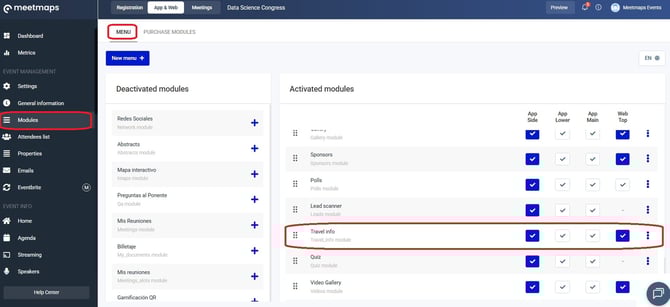
NOTE 🗒️: If it is not activated, contact the Meetmaps support team.
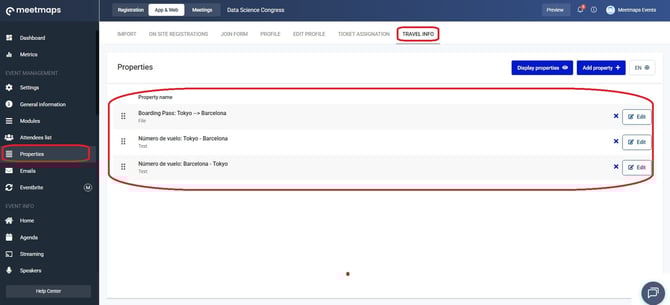
2. In App & Web > Properties > Travel Info, add the properties you want the attendees to see in this module about themselves.
Example: We add these properties:
-
Boarding Pass: Tokyo --> Barcelona (File property, PDF)
-
Flight number: Tokyo - Barcelona (Text property)
-
Flight number: Barcelona - Tokyo (Text property)
How it is displayed
-
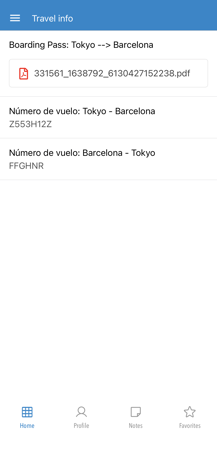
App📱
-
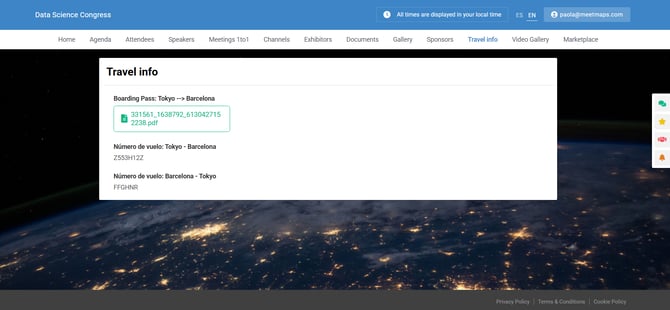
Web💻